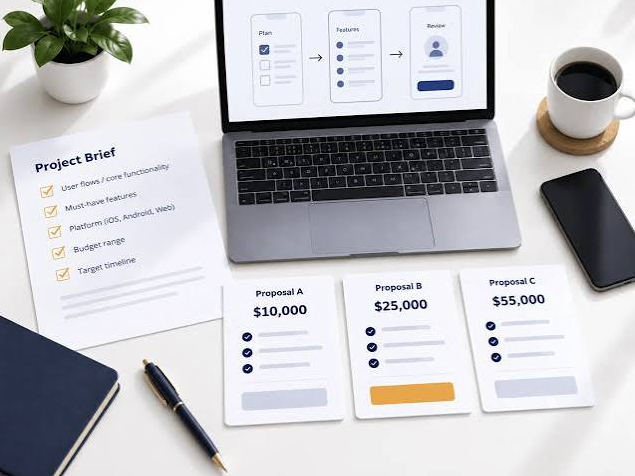
Many app projects run over budget for the same reason: the team started building before everyone agreed on what to build. A clear requirements document fixes that. It turns your idea into a shared plan that developers can price accurately and build with confidence.
Anyone can write one, with or without a technical background. Here’s how to create a requirements document that saves time, money, and frustration.
What a requirements document does
A requirements document describes what your app should do, who it serves, and how success looks. It gives development companies the detail they need to provide accurate quotes and timelines. It also becomes the reference point throughout the project, so decisions stay consistent.
1. Describe your business goal
Start with the purpose. Explain what problem your app solves and what result you want, such as more repeat bookings, faster ordering, or less manual admin. A clear goal helps developers recommend the right features and technology.
See also: Planning Ahead for Financial Independence in Later Life
2. Define your users
List the types of people who will use the app, such as customers, staff, drivers, or administrators. For each type, note what they need to do. A booking app, for example, may serve customers who book appointments, staff who manage calendars, and owners who view reports.
3. Map the main user journeys
Write out the key steps each user takes. For a customer in a booking app, the journey might look like this: open the app, choose a service, pick a time, pay a deposit, and receive a confirmation. Journeys reveal the screens and features your app needs.
4. List features by priority
Group your features into three lists:
- Must-have: features required for launch
- Should-have: features that add value soon after launch
- Nice-to-have: ideas for future releases
This structure helps you control your first budget and plan a phased roadmap.
5. Note integrations and existing tools
List the systems your app should connect to, such as payment providers, POS systems, booking software, CRMs, or accounting tools. Integrations often affect cost and timeline, so developers need to know about them early.
6. Choose your platforms
State whether you need an iPhone app, an Android app, a web app, or all three. If you’re unsure, say so. A good development partner will recommend the best approach for your users and budget.
7. Add design references
Share apps you admire and explain what you like about them, whether it’s the layout, the onboarding, or the checkout. Include your logo, brand colors, and any existing design guidelines.
8. Set your budget and timeline
Give a budget range and a target launch date. Developers can then suggest which features fit your budget and what a realistic schedule looks like.
Share it with the right development partner
Once your document is ready, send it to a few development companies and compare their responses. Strong partners ask thoughtful questions, suggest improvements, and explain their recommendations clearly. Many founders also value a partner they can meet in person to review the document together.
Founders in Texas often review their requirements with KodersPedia’s Dallas app developers during a free discovery session. In the Midwest, KodersPedia’s Chicago team helps businesses turn rough ideas into clear, buildable plans before development starts.
Keep the document up to date
Your requirements document should evolve as you learn. Update it after discovery workshops, design reviews, and user testing. A current document keeps your team aligned and prevents costly misunderstandings.
Final thoughts
A requirements document is one of the most valuable things you can create before hiring developers. It clarifies your goals, protects your budget, and helps your partner build the right app the first time. Spend a few hours on it now, and you’ll save weeks of rework later.


 By
 By